Dyctinna
-
Posts
5 -
Joined
-
Last visited
-
Desmume won't read pKHex/Hax edits [Pokemon Black 2 Redux]
Dyctinna replied to Dyctinna's topic in Saves - Editing Help
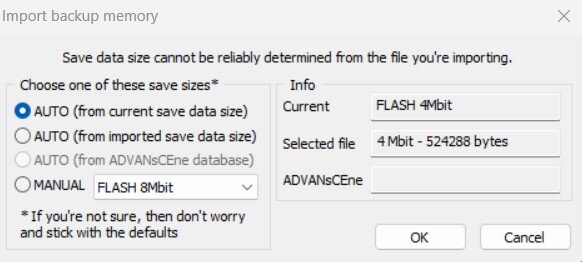
Update (for future problems other users may have): I tried with a normal Black 2 ROM and the PkHex successfully worked. The method was: export backup memory < edit in PkHex < Export not in "All Files" option, but SAV5B2W2 < Open Rom < Import Backup Memory < Select the SAV5B2W2 file, whose extension is .SAV < select the second option (AUTO - FROM IMPORTED SAVE DATA SIZE). It's probably a problem specific to Blaze Black 2 Redux. If someone managed to make PkHex work with BB2 Redux I will be extremely happy to take it back (it's a wonderful rom) :'D EDIT: I tried the same thing with Blaze Black 2 Redux, now the Snivy is correctly edited. The key passage is selecting the SAV5B2W2 file type and selecting (AUTO-FROM IMPORTED SAVE DATA SIZE). Thanks to @theSLAYER and @Kaphotics for the patience and kindness!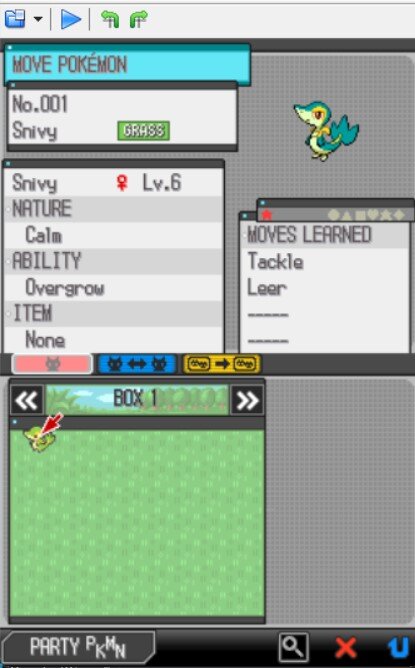
-
Desmume won't read pKHex/Hax edits [Pokemon Black 2 Redux]
Dyctinna replied to Dyctinna's topic in Saves - Editing Help
Sadly I tried doing all of these and combination of these but they either restart the game or the game uploads the .SAV or .DSV but never the changes. I think the problem is the hack rom because when I upload the edited file back into the editor, the Snivy Is correctly gender-swapped. I will try using a normal Black 2 rom to see if it's me doing something wrong or a rom problem. Again, thank you for your time -
Desmume won't read pKHex/Hax edits [Pokemon Black 2 Redux]
Dyctinna replied to Dyctinna's topic in Saves - Editing Help
I will try, thank you! Do you think that trying with a normal Black 2 rom would ease the process with Black Blaze 2 or you think there's no way it can work? -
Desmume won't read pKHex/Hax edits [Pokemon Black 2 Redux]
Dyctinna replied to Dyctinna's topic in Saves - Editing Help
Hi! Thank you for the quick reply. I tried to do that, saving in-game, using the .DSV file to edit in the PKHaX (by the way, Snivy was already gender swapped in the PKHex box), but when I exported the file from PKHax into a .DSV and ran the game, the game started again and the game was deleted (only option NEW GAME). (Thankfully I have back-ups so don't worry). While trying to export the file from PkHax, those in the picture below are the options; no direct "save as .DSV file" option. I had to rename the file as ".DSV" and put it in the same folder as Desmume, ran Desmume, and the only option was "NEW GAME". Could there be something wrong with my computer, for example? A matter of RAM, Hard Disk space?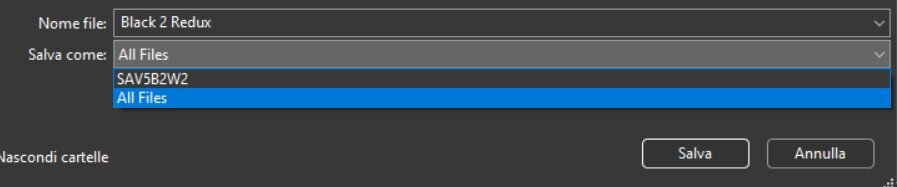
-
Hi all! I am currently having problems with editing with PkHex/Hax. Yesterday I have tried browsing this site to know if anyone had the same issue, but none of the solutions (which worked for other users) worked for me. ROM: Pokemon Blaze Black 2 Redux v 1.4.1 Desmume: v 0.9.13_x64 Editor: PkHax (a Reddit user suggested not using PkHex for fanmade hack roms). Other general informations that may help: I am 13 minutes into the game, just gotten my Snivy, so not in the tutorial anymore. Snivy is boxed. So, I normally save in-game, then reset to make sure the "Battery" folder has a clean .DSV save, then I copy the .DSV save into another folder, rename it .SAV, and open it with PkHax. The Snivy (boxed) appears on the left, I click "view", I change its gender from male to female, I click "set" to save the editing, and then export the file as a .SAV. When I try to import the .SAV, the "File data size cannot be reliably determined from the file you're importing". 1) I tried selecting the first option, but the game restarts, I continue the in-game save (as in a normal NDS, to be clear), but the Snivy is still male. 2) I tried selecting the second option, and the same happens. 3) I tried the manual option, and the game restarts, and "NEW GAME" is the only option. Second; I also tried converting the edited .SAV to a .DSV file, put in the same folder as the Desmume. The Desmume reads it automatically when I open the ROM, but can't read the editing. However, if I re-upload the edited .SAV file into the PkHax, the PkHax box has my Snivy correctly gender-swapped. It's like the file has been edited, but Desmume cannot read the editing. Anyone has any idea what could be happening here? I also tried browsing around to see if PkHax/Hex aren't compatible with Blaze Black 2 Redux, but from the various comments and posts it seems that this is not the case, and I am sure I am doing something wrong. Thank you in advance for your help!