I've read through other forum posts on this issue and tried to apply their advice, but none of it has worked so far. I'll provide some information below.
I've started playing Pokémon HeartGold through MelonDS. Since I use a Chromebook, I installed MelonDS on Linux using Flatpak. I installed Wineglass, also through Flatpak, and used it to run PKHeX after installing .NET Desktop Runtime 9. Afterwards, I made an in-game (through the game's menu) save, then exported the save file as a .SAV.
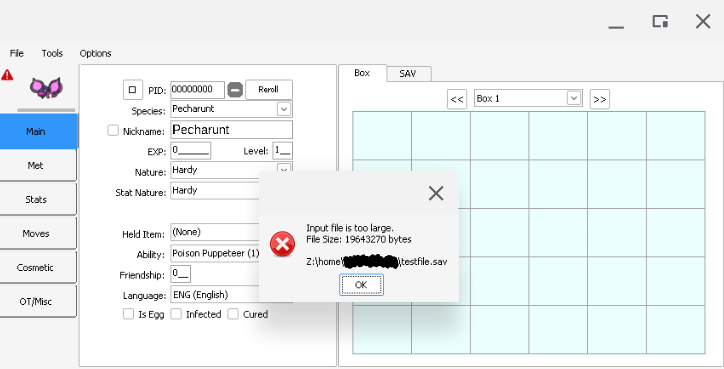
The issue is that when I tried opening the file on PKHeX, I received an error stating the input file is too large. I tried using an online hex editor in order to delete the bytes after 0x80000 as shown here, but after trying to open that file, I received a different error stating I had attempted to load an unsupported file type. I also tried making another .SAV file after making two in-game saves, then opening that on PKHeX, but I still received the error stating the input file is too large. Since all of the posts I've read with the same issue seem to be using a different emulator (particularly DeSuME), I haven't been able to figure out a way to change the .SAV file size on MelonDS itself.
Below, I've attacked an exact screenshot of the error. I can also attach my .SAV file if that would help. What can I do to fix this error? Thanks in advance!




 jin_qvdo changed their profile photo