Ginger Cat
-
Posts
3 -
Joined
-
Last visited
-

PKHeX v20250223 - "Legal" status requires manual update
Ginger Cat replied to Ginger Cat's topic in Pokémon Legality
Ah, that makes sense, and having that batch script for the troublesome ones got them back into order very quickly. Thank you for the very quick and specific help! -
PKHeX v20250223 - "Legal" status requires manual update
Ginger Cat replied to Ginger Cat's topic in Pokémon Legality
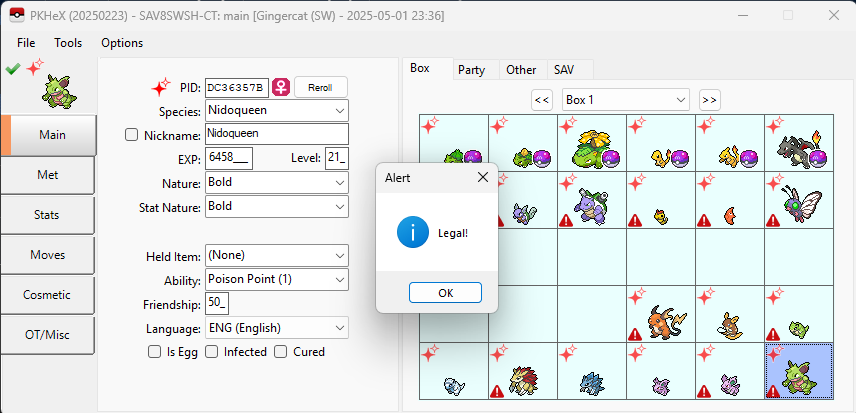
Thanks Kaphotics. It tells me "PID should be equal to EC!" when doing that Legality check. What changes when clicking the warning symbol in the top-left that not only declares it "Legal", but keeps the legality when using "Set" on that slot? The only thing that's "different" is that the warning was clicked on. If that's applying a fix of some kind, then perhaps I can Batch-apply that fix with the right command. If I simply "View" then "Set" without clicking the warning first so it changes to the green tick, the PID mismatch error gets "locked in" on that Pokémon from then on, and clicking the warning no longer "fixes" it itself. Likewise, doing the View -> Click -> Set chain of actions permanently "fixes" the Pokémon in that slot, so after a full file save and reload, it stays fixed. (But untouched ones are still marked as bad.) -
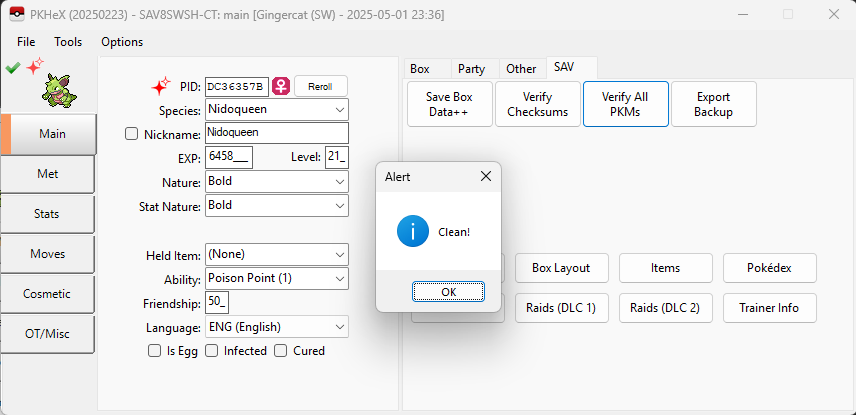
Got a problem happening at the moment that is probably a simple fix I'm overlooking, but I've imported a "Living Dex" into PKHeX just for fun, to use in my Pokémon Sword run. These little guys are all "Legal!" when the warning sign is clicked on and changes to a green tick, but unless they're then "Set", that recognition of Legal status doesn't stick, and they keep the red warning mark. I've used the "Verify All PKMs" option as well, and it doesn't have issues with any of them. If I simply "View" then "Set" that slot, the warning vanishes, but until I do that it stays in place even if I save, close, and reopen. Same if I open a different file, then reopen this one, so there's no potential for residual RAM data not being cleared or the like. Is there a Batch command I can run across all of the boxes so that it does a separate "View" and "Set" operation on all slots in all Boxes, or otherwise performs (and saves) a check to verify their actual legality? I can then check through and see if any of them are still failing the check properly and delete them.